SynaptaGrid Automation

Run the work, and watch it run

Build a process visually, connect any system that has an API, and see every run that happens.

Chain steps into a workflow with conditional branching and a human decision where one belongs. Any service with an API description becomes a step you can use. Runs retry, resume and keep their history, and operations can pause or throttle a workflow without a deploy.

Read the Automation documentation

Build-versus-buy boundary

The ownership boundary

This replaces platform machinery, not product judgment. The division should be clear before the feature catalogue starts.

SynaptaGrid owns the machinery

  • Execution state, retries, recovery and a step-by-step history for every run.
  • Schedule, record and signed external triggers, including a wait for human decisions.
  • Connection throttling and live controls to pause, resume or recover without a deploy.
Your team owns the decisions

  • What the process should do, how exceptions route and who may approve.
  • The credentials and contracts of every system the workflow calls.
  • Which failures need automation, human intervention or a product-level response.

Infrastructure replacement, not outsourced product design. Review security and deployment →Review portability and continuity →

Define the work

One place for every workflow and version

Create the process, publish a version and keep the definition visible to the people who operate it.

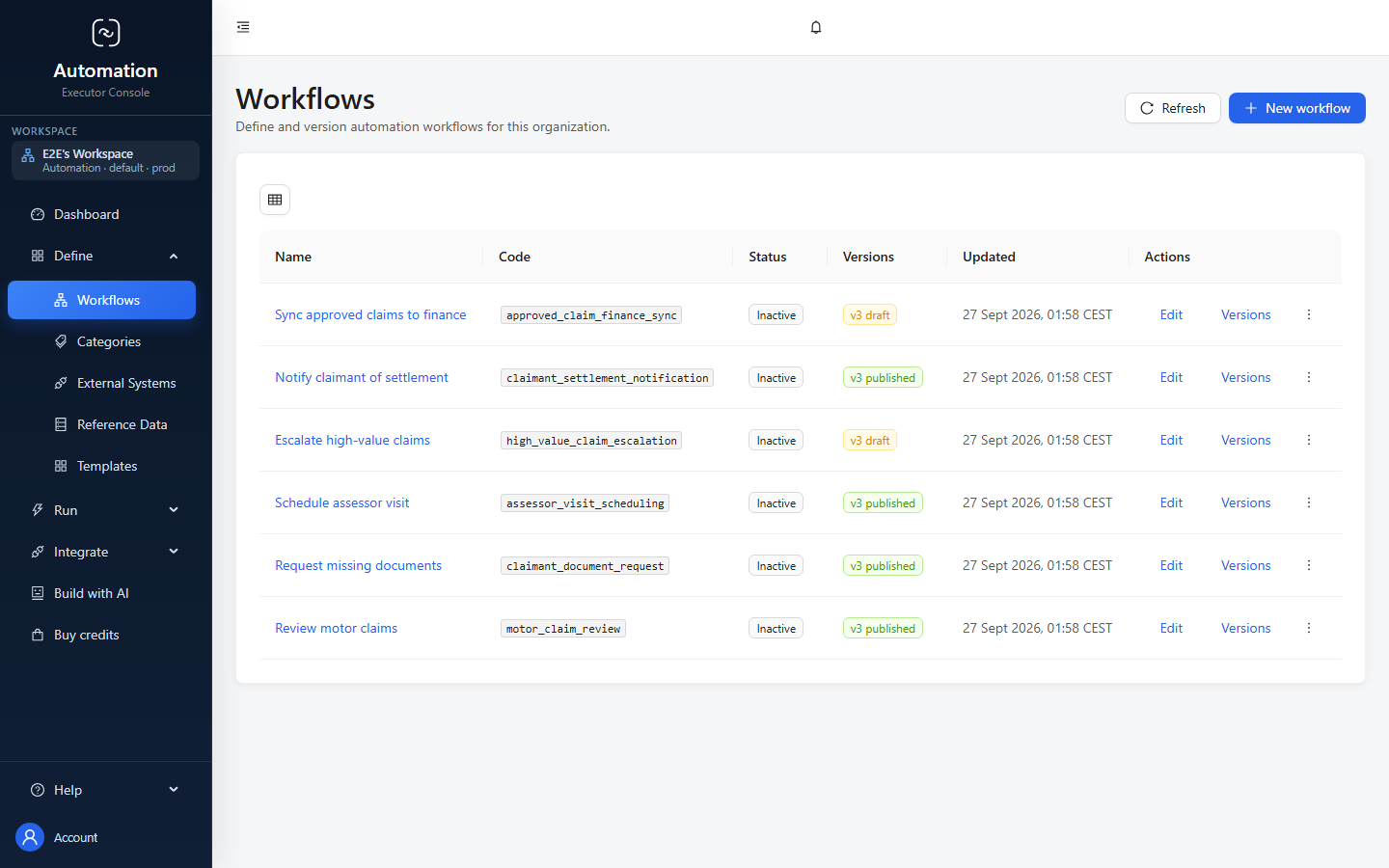
The Automation workflows screen, with workflow name, code, status, version, updated date and action columns plus a control to create a new workflow.
Workflow definitions and their versions, in the product.

Connect the work

The systems a workflow can call, made explicit

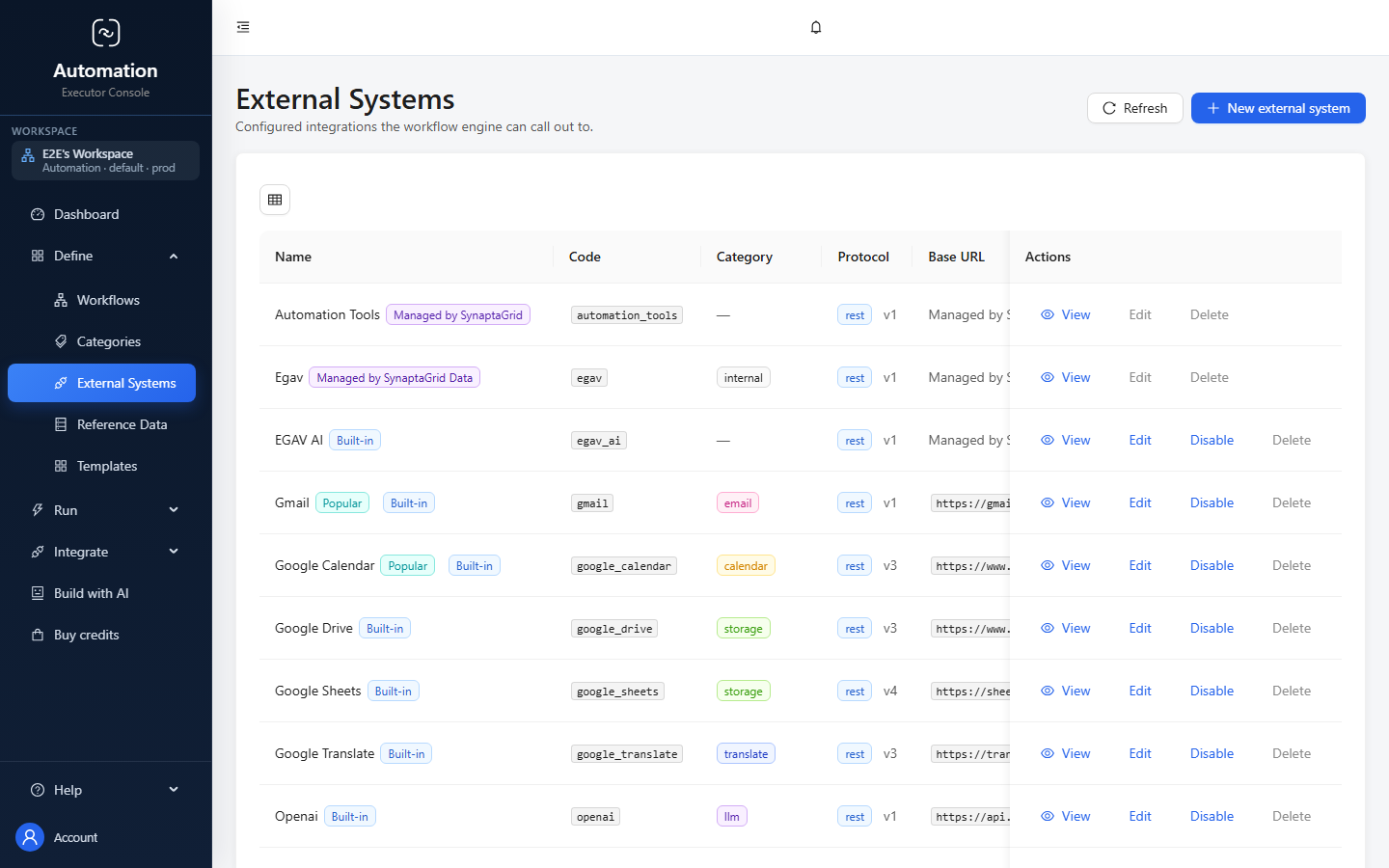
See each connection, its protocol and its operational controls before it becomes part of a process.

The Automation external systems screen, listing built-in and managed integrations with their codes, categories, protocols, base URLs and available actions.
Managed and built-in connections, ready to use as workflow steps.

When it breaks

Fix the run, not the whole process

A three-day approval should not have to happen twice because a downstream API was briefly down.

Run 4,182

Supplier invoice review

Step failed
Invoice record created

trigger · +0s

Read the document

took 4.2s

Finance approval

approved by M. Okonkwo

Post to the finance systemfailed

502 from the finance API after 3 retries

Notify the supplier

Fix the run, not the whole process

The approval above took a person and three days. Re-running the workflow from the top would ask for it again. These verbs exist so you do not have to.

Restart the step

The finance API is back. Retry that step in place — the approval stands.

Rewind

The document was read wrong. Go back to that step; everything after it is marked superseded.

Replay

You want the whole run again with the same input, recorded as a replay of this one.

Signal

The run is waiting on something external that has now happened.

A run whose conditions match nothing stops and waits for an operator rather than guessing. These are how you deal with it.

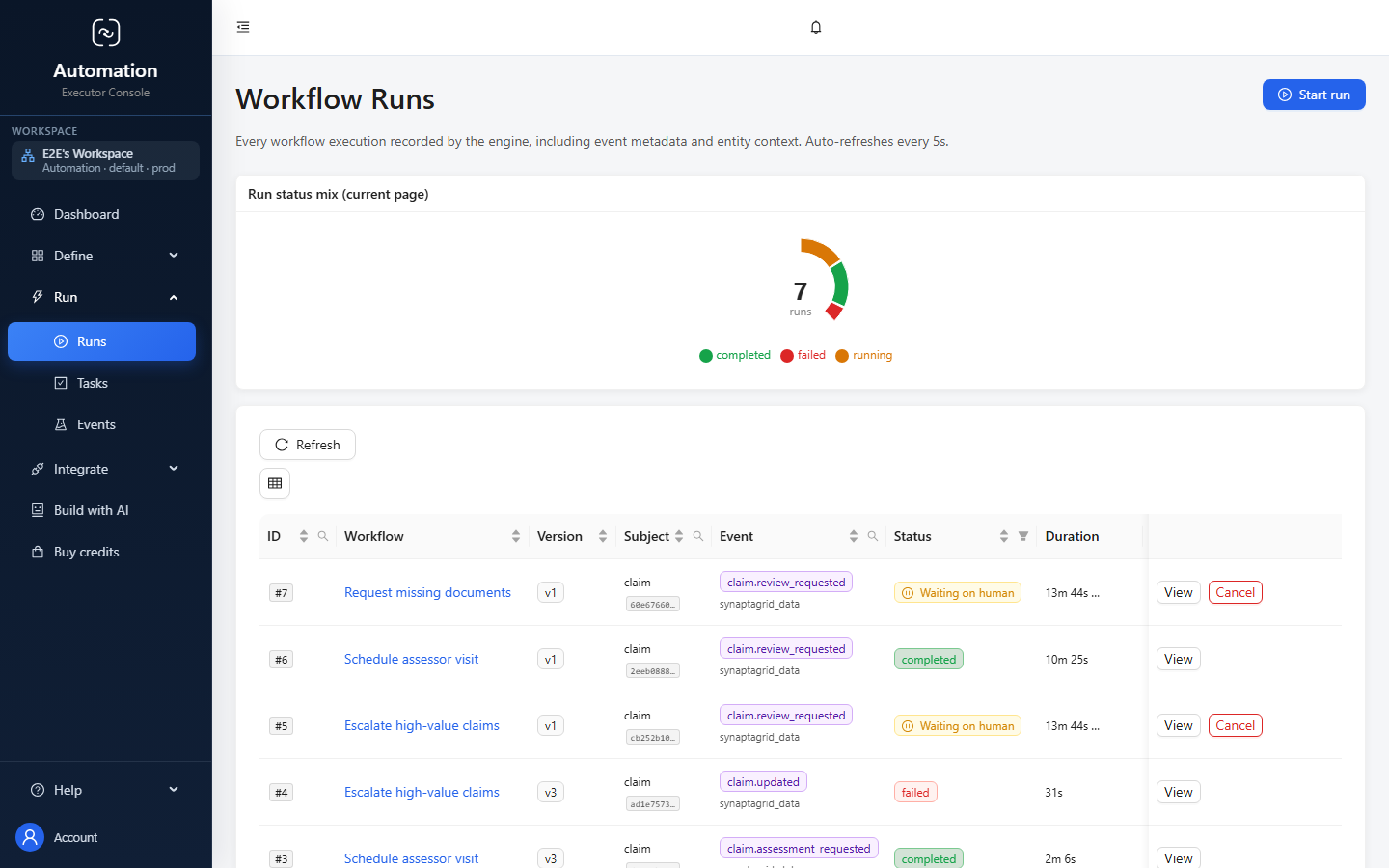
The Automation workflow runs screen, with columns for workflow, version, subject, event, status, duration and start time.
Every workflow run, its state and its timing, in one operational view.

When it matters

An approval you can put in front of an inspector

Who approved it, that they proved who they were, and that nothing has changed since.

Decision required

Approve settlement · CLM-1043

ApproveReferDecline

Your vocabulary, not a generic approve/reject.

Confirm it is you

Re-authentication at the moment of signing, with a second factor where the decision warrants it.

Reason for signing
▾

Chosen from codes you define.

signaturechained to the one before
payloadimmutable once recorded

Approvals that stand up to an inspection

For regulated approval it is not enough to know a record was approved. You have to show who approved it, that they proved who they were at that moment, and that nothing has been altered since.

  • Re-authentication at the point of decision, with a second factor where warranted
  • A required reason, from codes you define
  • Signatures appended and chained, so alteration is detectable
  • The decision payload becomes immutable once recorded
  • Approval rules: one person, a role, a named list, a quorum, a weighted vote, any-of or all-of
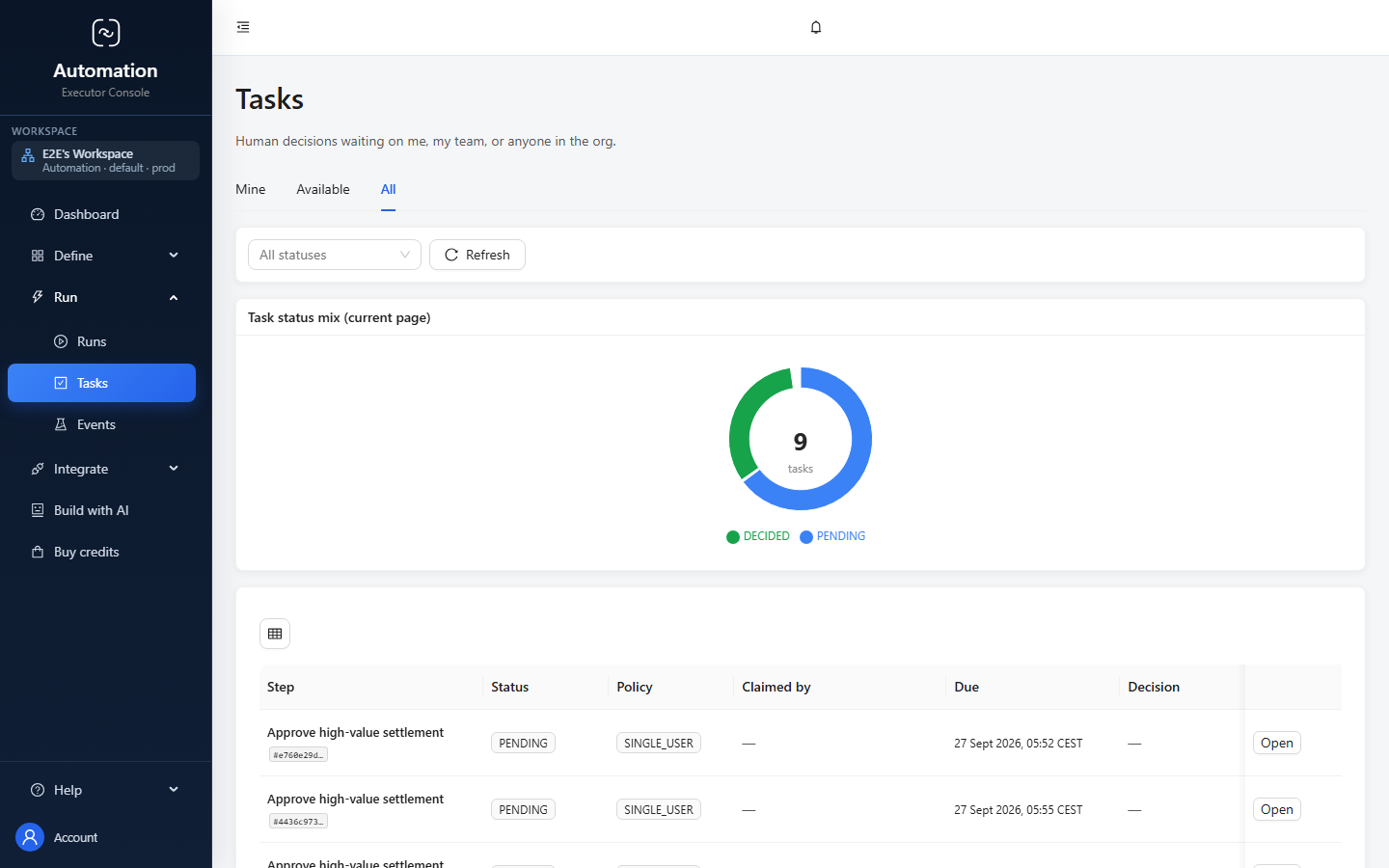
The Automation tasks screen, with Mine, Available and All queues plus status, assignment, due date, decision and regulated-work columns.
Human decisions stay visible, claimable and traceable alongside the workflow.

Process

Run the work, with people in it

Draw the process, decide what triggers it, and stop for a human decision where a human decision belongs.

6 capabilities

Draw the process, then run it

Lay out steps on a canvas and connect them with labeled, conditional links — the diagram is the thing that executes.

Each link can carry a condition; the first matching link wins, and a link with no condition is the default path. A malformed condition refuses to match rather than guessing, so a mistake stops the run instead of silently taking the wrong branch.

  • Drag-and-drop canvas with a palette, a properties panel, link editing and undo
  • Step types for calling a service, asking a person, or waiting for something
  • Conditional links with an explicit order, plus a default path
  • Conditions compare, match a list, check containment or check existence, and combine with all, any and not
  • Loop back to an earlier step for rework, with a re-entry cap that fails loudly rather than spinning
  • Per-step timeouts, priority, and whether a step may be skipped

It refuses to publish a broken process

Before a version goes live, the workflow is checked for unreachable steps, dead ends, and human decisions that lead nowhere.

  • Every step must be reachable and every path must terminate
  • Every possible human decision must have a link that handles it
  • Each step type must have the fields it needs to run
  • A structurally broken workflow is refused at start time as well as at publish time

A running process finishes as it started

Publishing freezes a version, and a run stays on the version it began on — so changing the workflow never rewrites what is already in flight.

  • Immutable published versions, with the draft left editable
  • In-flight runs follow the frozen version they started on
  • Start from a template gallery, or save your own workflow as a template
  • Organize workflows into categories
  • Reusable reference lists — decision codes, reason codes, priority levels — shared across workflows

Start it however it needs to start

A workflow can be triggered by a record changing, by a signed call from another system, on a schedule, or by hand.

A trigger will not arm until its field mappings are complete. That gate is deliberate: a half-configured trigger that fires is worse than one that refuses to.

  • On a record being created, updated, deleted or promoted to a new version
  • From any external system over a signed HTTPS call, with per-source secrets you can rotate
  • On a schedule — cron, a fixed interval, or once at a set time
  • By hand from the portal, or programmatically with a scoped API key
  • Filters on the trigger, so only the records you care about start a run
  • Repeated triggers for the same subject return the run already in progress instead of starting a second one
  • Repeat deliveries of the same event are recognized and ignored
  • A run can take a whole set of related records as its subject, resolved from a filter

Stop and ask a person

A step can pause for a human decision, with the task appearing in an inbox and the answer choosing which path the workflow takes.

The decision options and the form are fixed at the moment the task is created, so editing the workflow later never reshapes a task somebody has already opened.

  • A task inbox with filtering by assignment, status, run and workflow
  • Claim, release, decide, reassign, or withdraw your own decision
  • Claims are leased, and an abandoned claim is released automatically
  • Approval rules: one named person, anyone in a role, a named list, a quorum, a weighted vote, any of, or all of
  • Your own decision vocabulary and reason codes per step, and the decision chooses the outgoing path
  • Deadline warnings, and escalation when a decision takes too long
  • Optionally lock the record while it is under review

Approvals that stand up to an inspection

A decision can require the person to re-authenticate and state why, producing a tamper-evident signature record.

This is built for regulated approval, where it is not enough to know that a record was approved — you have to show who approved it, that they proved who they were at that moment, and that the record has not been altered since.

  • Re-authentication at the moment of signing, with a second factor where the decision warrants it
  • A required reason for signing, chosen from codes you define
  • Signatures are appended and chained, so alteration is detectable
  • The decision payload becomes immutable once recorded
  • A dedicated signature and audit view per task

One record, one continuous trace

Use one, or use both

Data governs the record. Automation runs the work around it. Publish a Data model and its record operations become available to Automation; bind the entity, map the fields and arm the workflow without rebuilding a connector.

Change the model, not the release plan →
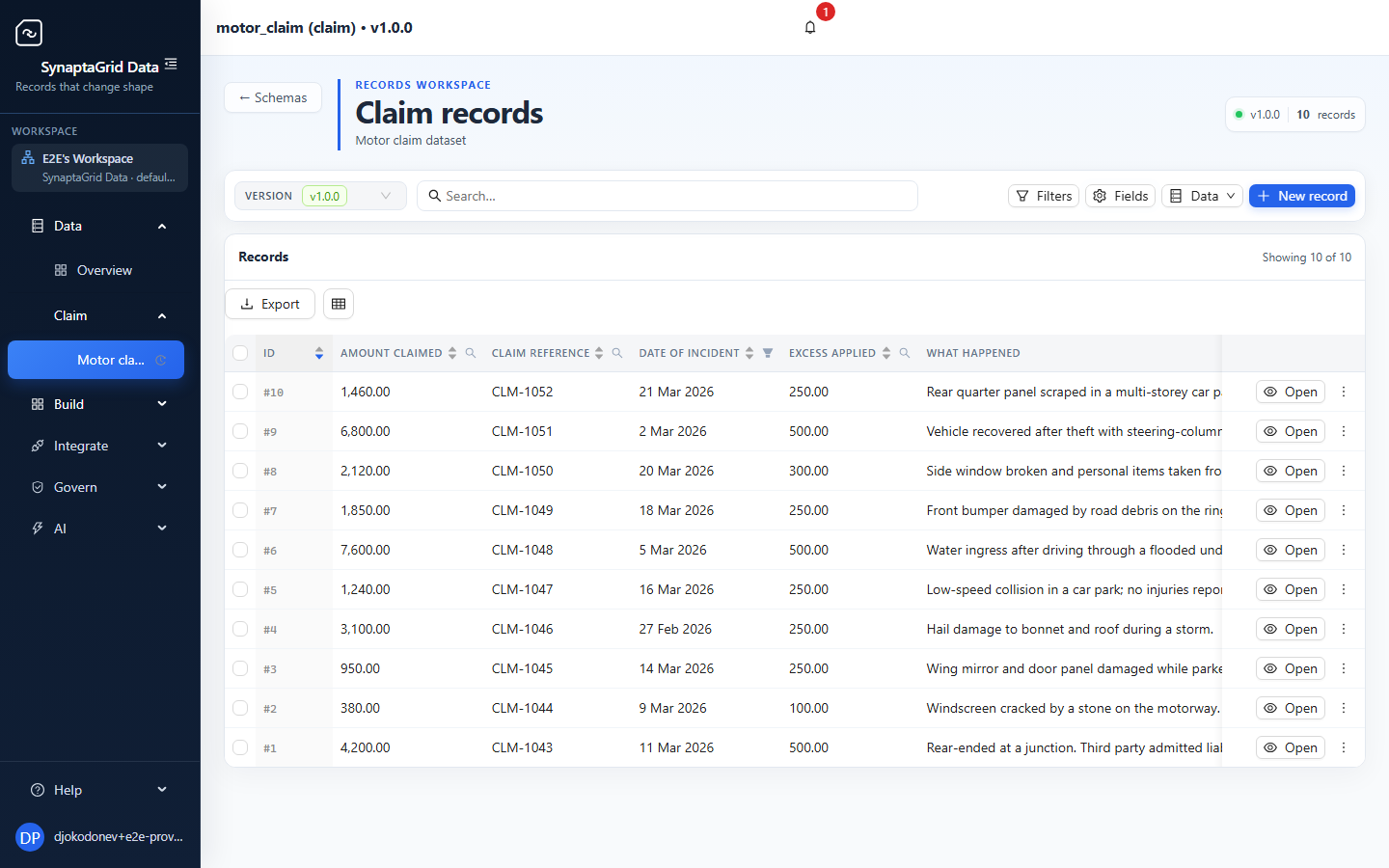
The Data records screen, showing ten motor claim records with claim references, incident dates, claimants, settlement values and statuses.
Data holds the governed record and its current values.

Trigger contract

The same record, now armed for work.

Armed
Automation workflow trigger showing the claim record bound to Created and Updated events with armed status.
Automation listens only after the entity, lifecycle events and mappings pass the arm gate.
  1. 01

    Data

    Publish the record contract

    Publishing the model makes its typed record operations available in Automation. There is no connector to rebuild.

  2. 02

    Automation

    Bind the record to a workflow

    Choose the record and the lifecycle moments that matter — Created, Updated or Deleted — then arm the binding.

  3. 03

    Automation

    Map the current record

    A step can read the record fresh just before it acts, instead of relying on an older event snapshot.

  4. 04

    Both

    Run with a complete history

    Every decision, retry and explicit record update remains visible in the workflow run history.

See it built end to end

Procurement, invoices, contracts, onboarding and more — each followed from an empty account to a running process, in the order somebody would do it.

Try it on something real

The trial runs the same product described on this page.